
The 2027 SAP Solution Manager deadline is approaching—Future-proof your ALM today.
Your SAP Cloud ALM Strategy, Defined in 48 Hours.
Connect SAP Cloud ALM to Jira, ServiceNow, and AutonomOps AI with SapSense.
Sapsense is the SAP Architect’s choice for a Clean Core transition to SAP® Cloud ALM
Stop guessing and start migrating. Sapsense delivers a comprehensive, automated blueprint of your SolMan-to-Cloud ALM transition strategy in just 48 hours. We then execute your migration in focused 7-day Technical / Functional sprints, backed by rigorous automated testing.
Extending SAP Cloud ALM with Best-of-Breed AI & DevOps






Features & Benefits
The Complete Framework to Audit, Migrate & Modernize
Stop fighting your legacy SAP Solution Manager data. Sapsense provides the automated intelligence you need to extract value, execute a Clean Core transition, and scale your operations on SAP Cloud ALM. [View Methodology]

Scalability & Flexibility
We don’t believe in “all or nothing.” Our SDT experts selectively migrate high-value process documentation and test cases, ensuring your new SAP Cloud ALM environment remains lean, agile, and free of legacy technical debt.

Smart Alerts & Notifications
Move beyond static email alerts. By integrating AutonomOps AI, we transform standard SAP Cloud ALM health signals into autonomous investigations, providing your SRE team with root-cause analysis (RCA) before the business is impacted.

Seamless Integration
Bridge the gap between SAP and your IT landscape. We pre-configure bi-directional sync between SAP Cloud ALM and enterprise tools like Jira for development, ServiceNow for ITSM, and Azure DevOps for CI/CD pipelines.

Workflow Automation
Eliminate the risk of “Big Bang” migrations. Our AI workflows break your transition into manageable, 7-day functional sprints, from Solution Docs to Change Mgmt, allowing for continuous validation and zero downtime.

AI-Powered Insights
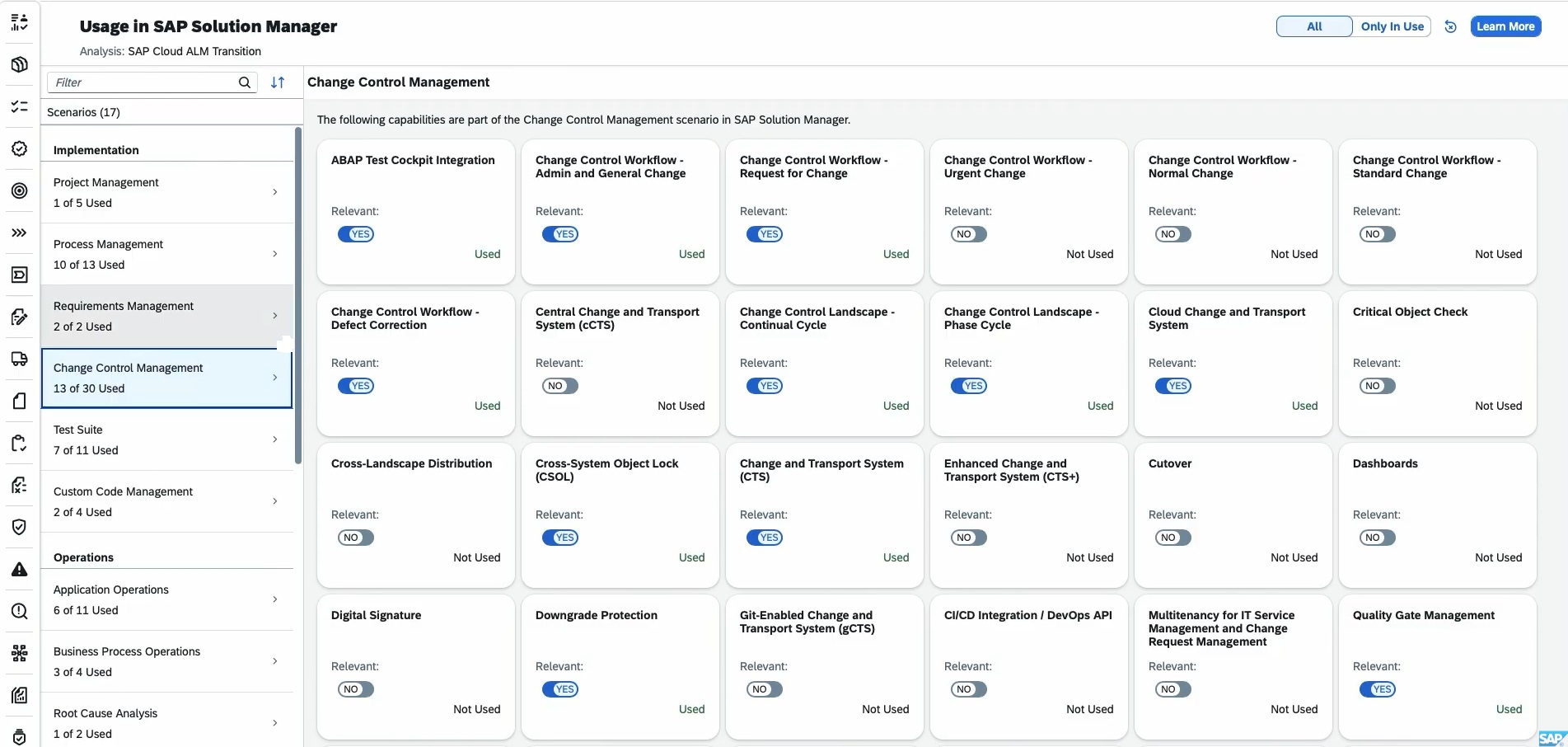
Leverage AI to audit your legacy Solution Manager footprints. SapSense analyzes your current usage to identify redundant custom hierarchies and obsolete documentation, ensuring your move to SAP Cloud ALM is a “Clean Start” that only carries forward what your business actually uses today.

Advanced Analytics
Gain 360-degree visibility across your entire SAP landscape. We consolidate cross-platform data into unified SAP Cloud ALM dashboards, giving Architects and Stakeholders real-time insights into project progress, system health, and release readiness.
Featured Sections
We Don’t Just Offer Software — We Offer Solutions
Lorem ipsum is placeholder text commonly used in the graphic, print, and publishing industries for previewing layouts and visual mockups.

Analytics & Reporting
Intelligent Insights at Your Fingertips
Lorem ipsum is placeholder text commonly used in the graphic, print, and publishing industries for previewing layouts and visual mockups.
Growth & Scaling
Unmatched Flexibility and Scalability
Lorem ipsum is placeholder text commonly used in the graphic, print, and publishing industries for previewing layouts and visual mockups.


AI Automation
Transform Your Workflow with AI Automation
Lorem ipsum is placeholder text commonly used in the graphic, print, and publishing industries for previewing layouts and visual mockups.
Testimonials & Reviews
Hear From Our Happy Clients: Their Stories
Lorem ipsum is placeholder text commonly used in the graphic, print, and publishing industries for previewing layouts and visual mockups.

Emily R.
Marketing Lead

We switched from a legacy tool, and I can’t believe the difference. Setup was a breeze, and every question I had was answered within minutes. That level of care is rare.

Mark T
Startup Founder
I love how everything just works. No steep learning curve, no messy configurations—just a clean, powerful product that delivers what it promises.

John Doe
Founder
Beyond the robust features, what really impressed me was the onboarding support. They walked me through everything step-by-step and made us feel valued.

Jason M
Product Manager
The features are great, but the support team truly sets this SaaS apart. From onboarding to daily use, their quick responses and helpful guidance made the whole experience smooth and stress-free. It feels like we have a real partner, not just a service.

Lena K
UX Consultant
This SaaS solution is a gem. It adapts perfectly to our needs, scales effortlessly, and the team behind it feels more like a partner than a provider.

Aliana Lorel
Founder – Lorel Technology
As someone who’s tried countless tools, this one stands out. Performance is solid, updates are regular, and customer service? Simply outstanding.

Sara D
Freelancer
This platform completely transformed how we manage our workflow. The intuitive UI, along with a support team that truly cares, makes it one of the best SaaS experiences I’ve had.

David V
IT Director
Smooth, fast, and reliable. Our team instantly became more productive. The personalized help during onboarding made a huge difference.

Peter Brandson
Owner – Brandson Industry
User-friendly, beautifully designed, and packed with functionality. I’ve never experienced such responsive support. Worth every penny.
Latest News & Articles
Lorem ipsum dolor sit amet, consectetur adipiscing elit, sed do eiusmod tempor incididunt ut labore et dolore magna aliqua.
Frequently Asked Questions
Got Questions? We’ve Got Answers.
Lorem ipsum is placeholder text commonly used in the graphic, print, and publishing industries for previewing layouts and visual mockups.
What is Full Site Editing in WordPress?
Full Site Editing in WordPress allows users to create and edit their website more efficiently and with more control. It enables users to create unique and custom designs without needing to have advanced coding skills.
What are the benefits of Full Site Editing in WordPress?
Full Site Editing in WordPress refers to a feature that allows users to create and edit their website’s entire layout, including the header, footer, and other structural elements, using a visual editor.
How do I enable Full Site Editing in WordPress?
To enable Full Site Editing in WordPress, you need to ensure that you are using a compatible WordPress theme that supports Full Site Editing. You will also need to install the latest version of WordPress and enable the Gutenberg editor.
What are the benefits of Full Site Editing in WordPress?
Full Site Editing in WordPress refers to a feature that allows users to create and edit their website’s entire layout, including the header, footer, and other structural elements, using a visual editor.
How do I enable Full Site Editing in WordPress?
To enable Full Site Editing in WordPress, you need to ensure that you are using a compatible WordPress theme that supports Full Site Editing. You will also need to install the latest version of WordPress and enable the Gutenberg editor.
What are some popular WordPress themes that support Full Site Editing?
Some popular WordPress themes that support Full Site Editing include the FotaWP Theme, ReviveNews Theme, and the Hello Agency Theme. These themes have built-in support for Full Site Editing, allowing users to create custom designs without needing to know how to code.
What are the benefits of Full Site Editing in WordPress?
Full Site Editing in WordPress refers to a feature that allows users to create and edit their website’s entire layout, including the header, footer, and other structural elements, using a visual editor.

Try It Free. Scale When You’re Ready.
Get started without limits. Explore all features at your own pace — upgrade only when your business grows.